Pulse Labs
2026
Building the Toolkit: Designing Capture Methods for Pulse Labs Researchers
The reimagined flow allows researchers to set up adaptable projects for quick insights, and holistic results over time.

OVERVIEW
Unifying Surveys, Observations, and App Integrations
Meeting Customer demands as they grew meant that our research flow capabilities were pieced together as we grew. In a push to synchronize our capture methods as modular building blocks, I was tasked with ensuring survey creation, naturalistic observations, and embedded feedback methods worked seamlessly with each other and all other captures so they can be combined into one project as needed.

Initial actions for a new project: captures, participants, and collaborators

Capture method details before launch

Conditional logic for participants
PROBLEM
Fragmented studies were slowing down insights.
Pulse Labs exists to provide fast insights from human-centered research. But as we grew in customers and new/existing customer needs, getting quick insights back to them became more difficult instead of easier. Multiple factors contributed to the problem, but a major cause was due to a flaw in single-method study setup.
STUDY V1
Screens and recruits
40 participants invited
Surveys started
STUDY V2 — DUPLICATE
Reinvites participants
Surveys imported
Interviews facilitated
STUDY V3 — DUPLICATE
Reinvites participants
Surveys and interviews imported
Diaries launched
Pain Points
TARGET USER
The Researcher Power-User
Dynamic research scope
Research plans shift as insights are learned. Researchers expect tooling to flex to their needs instead of being forced to reconfigure.
Reusable participant pools
Panels are reused across methods and over time, so participant pools need as much consistency as possible.
Important Boundaries
Researchers understand that automation speeds up work, but doesn't replace domain expertise or critical thinking.
DESIGN PROCESS
Getting Started
Designing the shift from single-method to multi-method projects started out intimidating. There was the threat of breaking integral aspects of study creation, such as study length, invites, task scheduling, and payout mechanics. So, I started out by imagining max states for each capture method and then applied the same process to a max-state project. The thinking was to ensure that capture methods were adaptable to different customers/industries, but also modular as building blocks so captures felt unified when combined into bigger projects.
Key Decisions
Pushing to add survey import options despite a rushed timeline
Competitive analysis provided the insight to ensure that there's an easy way for researchers to get started on new surveys when the planning is already accounted for.
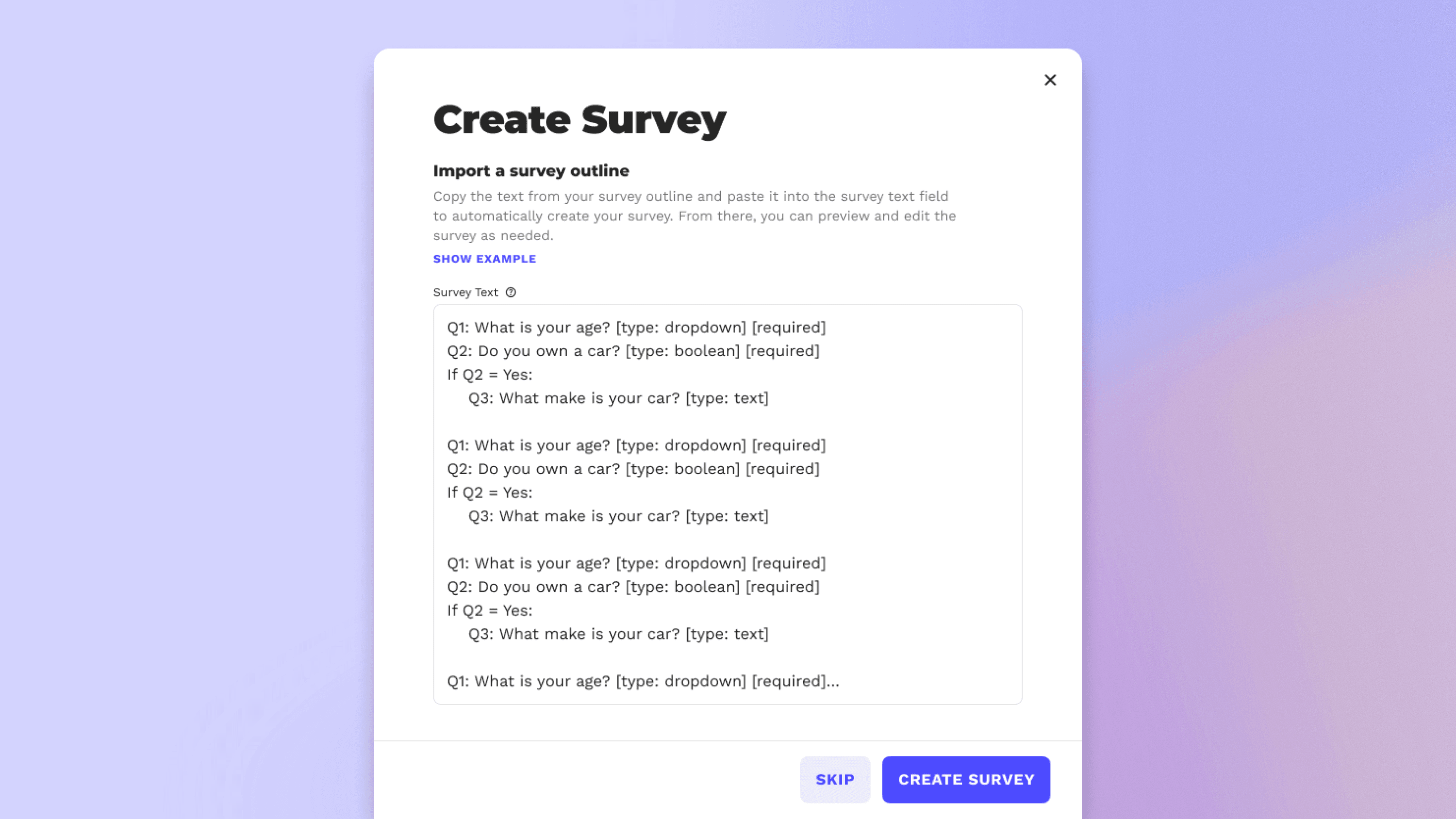
Rich-text survey import field

Participant sidebar actions within survey view
Placing survey submission view in a sidebar instead of a full-view modal
At first, it felt like survey answers needed to be front-and-center in a full-modal view. But after testing internally, the sidebar view was actually more natural than expected to sift through survey answers.
Designing Observations based on the App Integrations foundation
App Integrations went through an evolution to be used more widely over time, as the product expands for various research needs. Yet, Observations was the adjacent capture method to how App integrations started in the first place. So, using the foundation made sense to solidify the naturalistic observation method.

Observations progress; submission history

Submission statuses across all capture methods
Creating universal submission states across capture methods
Across capture methods, there are various necessary and unnecessary statuses. Still, it makes a complex product more simple when unifying statuses across all captures and using each status where it's appropriate.
OUTCOME & RESULTS
Monumental progress towards an all-in-one platform
The primary action that this changed is that researchers no longer set up research per method. A single project can now hold a screening survey, research surveys, follow-up interviews, and an observational study, that all leads into the same set of insights . Expanding into a new capture method doesn't reset the researcher's work. Studies can be set up fully in the beginning and then adapt over time as needed, based on ongoing insights, flexible participant pooling, and changing research needs.

ENROLL PARTICIPANTS
Researchers can add participants to capture methods after inviting and enrolling them to to the project.

ADD CAPTURE METHODS
The new project architecture makes it easy to add and manage capture methods.
CAPTURE METHODS
Survey Creation
Creation for screenings and research surveys utilize SurveyJS. We stripped down the integration for our researcher's needs, customized certain question types to apply to the research we help with, and wrapped it with our design system.

Researchers can start by importing their questions or jump right into the survey builder.

Task ratings are a part of evaluations, but they mimic the survey builder.

Approval settings for screenings live within verification at the project level.

Researchers can preview their survey for mobile and desktop views.
CAPTURE METHODS
Observations
Naturalistic observations for mobile/web apps

Participant desktop view of a self-directed observational study.

Conditional logic for project audience and capture settings for Observations

Observations mobile view: project details and feedback prompt
CAPTURE METHODS
App Integrations
App integrations body copy

The App Integrations dashboard and a feedback prompt triggered on mobile (participant view).

Steps to install the SDK in the UI SceneDelegate via a one-line import and an SDK key.
The Results
20-minute decrease in
overall setup times
Studies averaged 32 minutes to set up. Adding a capture method takes on average 12 minutes.
Doubled capture methods within rolling 3-month period
Number of new capture methods added doubled after 3 months on the new platform
Google Trusted Tester's
program launch
The implementation of Observations made it possible for a new project with Google
What I'd do differently
De-prioritize internal researcher insights
I thought our researchers would be good for insights to design for, but our customers had much different pain points than I imagined.
Push against third-party constraints
I would have pushed for native survey creation despite the time crunch (integrating SurveyJS took longer than expected anyways).
Design Survey Creation alongside Task Ratings
Survey creation needed to be finished before Evaluations became in the works. But if we could redo it all, I would go about Survey Creation the same way we implemented Task Ratings.